Your front desk is already doing two jobs at once. Phones keep ringing, the portal inbox keeps filling, prior auth requests keep waiting, and every missed handoff becomes another apology to a patient who just wanted a simple answer. That's why medical virtual assistant services are getting attention, but the wrong purchase here leads to more work, not less.
The smart way to buy is to ignore the glossy feature list and measure what changes in your clinic: minutes saved, undertriage risk, clinician override rate, and whether the workflow gets simpler after week three instead of messier. If you choose a vendor because the demo looked polished, you're guessing. If you choose one because it passes a hard operational test, you're managing the practice like a real operator.
What Medical Virtual Assistant Services Actually Are
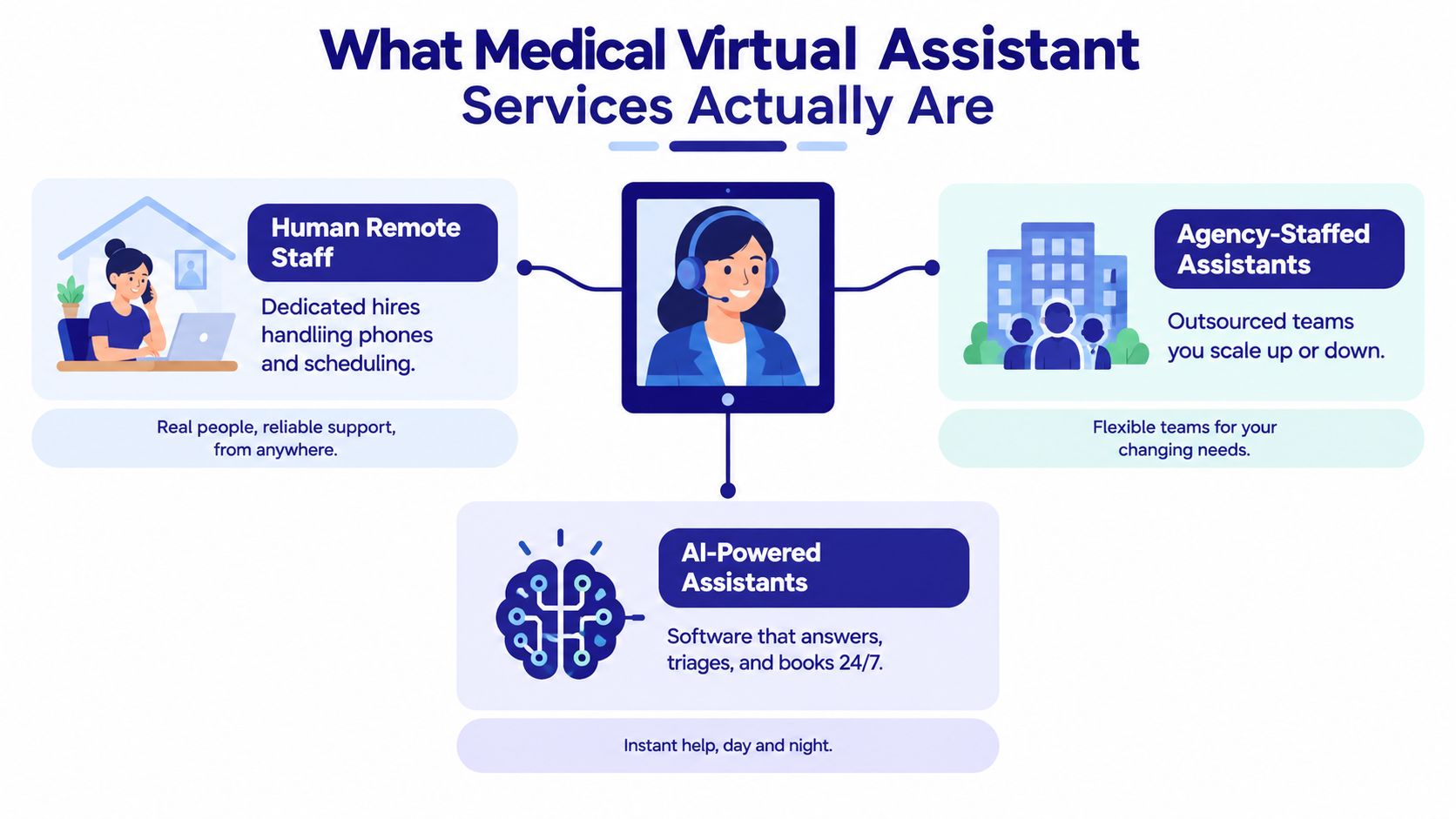
A tired clinic manager usually starts with one picture in mind, a friendly receptionist sitting inside a tablet, answering calls and booking appointments. That image is too narrow. In practice, medical virtual assistant services come in three very different forms, and the label alone doesn't tell you which one you're buying.
The three versions you'll actually see
The first is human remote staff, a person who works offsite as part of your team. The second is agency-staffed assistance, where the vendor supplies and manages the worker or team for you. The third is AI-powered assistance, software that answers questions, routes requests, and handles routine patient communication, often through a phone line, portal, or EHR workflow.
The distinction matters because healthcare adds three things that generic virtual assistant work doesn't: clinical risk, compliance burden, and integration cost. A generic assistant can answer email. A medical assistant touches patient information, scheduling, documentation, and sometimes triage workflows, which means the vendor's staffing model, training, and controls matter as much as the interface.
Practical rule: if the vendor can't clearly say whether you're buying labor, managed labor, or software, keep looking.
What you should be screening for
Ask what the assistant will touch on day one. If the answer includes patient calls, charting, scheduling, or anything inside the EHR, you're no longer shopping for a simple admin tool. You're evaluating a workflow component that needs supervision, access controls, and a fallback path when it's wrong.
That's why the website label is not enough. A “virtual assistant” page might hide a human scribe, a shared offshore admin pool, or a chatbot wrapped in healthcare language. Your job is to separate the delivery model from the sales language before you compare price.
Tasks and Use Cases That Actually Work
The strongest use cases are boring, repetitive, and easy to standardize. That's exactly why they're worth delegating. When physicians were asked what they were using large-language-model assistants for, the top uses were medical information and education at 53.4%, research-design support at 38.1%, and documentation or dictation at 33.1% MGMA. That tells you where the demand sits, and it's not flashy diagnosis.
The workflows that pay back first
Start with tasks that repeat every day and don't need human judgment every time. Scheduling, appointment reminders, insurance verification, billing follow-up, intake collection, and routine documentation support are the easiest wins. They're predictable, they're measurable, and they're usually where your staff burns the most time.
The evidence also supports bounded clinical-adjacent work, not open-ended clinical authority. A review of 46 studies across 17 countries found usability scores ranging from 68 to 85 on the System Usability Scale, which suggests many tested systems are workable for users, but diagnostic accuracy ranged from 33% to 93%, so you should not treat any assistant as a universal decision-maker review. In plain English, these tools can help collect information, explain instructions, support follow-up, and route patients. They are not a substitute for clinical review.
The best production use cases are the ones with a clean handoff. Intake forms, symptom collection, post-visit follow-up surveys, medication reminders, and appointment workflows are useful because they compress admin time without pretending to replace a clinician.
Clinic rule: if a workflow can be written as a script, it's a candidate. If it depends on nuanced judgment every time, it needs a human checkpoint.
What looks good in a demo and fails in week three
The traps are easy to spot once you've seen enough implementations. Anything that promises to “handle everything” usually creates review work somewhere else. If the assistant cannot escalate uncertain cases, can't document cleanly, or doesn't fit your EHR workflow, your staff will end up cleaning up after it.
Use cases like research support and medical education can work well inside a controlled environment, but they don't replace front-office relief. For most clinics, the business case is still administrative. The assistant should free staff from repetitive tasks, not give them another system to babysit.
See a practical staffing workflow comparison for medical teams
HIPAA, Data Handling, and the Real Compliance Checklist
“HIPAA compliant” is the start of the conversation, not the end. A vendor can say the right words and still fail on data routing, access control, retention, or escalation. HealthcareAsia's coverage of adoption barriers points to the key issues, privacy, cybersecurity, legacy-system integration, uncertain governance, and overreliance on AI, and it stresses that responsible deployment needs strong identity and access controls, clinically reviewed content, bias monitoring, and reliable human escalation Healthcare Asia Magazine.
The questions that matter more than the sales pitch
Ask where patient data is processed. Ask whether it's retained. Ask whether the vendor uses it for model training. Ask whether patients can request deletion or access. Ask what happens when the assistant can't understand a language, a disability-related need, or an emergency symptom.
A signed BAA matters, but it doesn't prove safe deployment. You still need to validate role-based access, audit logs, encryption in transit and at rest, incident response, and the handoff back to a human when uncertainty shows up. You also need to know whether the vendor's support staff are trained, screened, and monitored, because the weakest part of the workflow usually fails outside the model itself.
The jurisdiction issue is real too. If you serve patients across borders, a HIPAA-only checklist is incomplete. GDPR-oriented organizations, Canadian providers, and cross-border telehealth teams need to think through consent, storage, access, and transfer rules, not just a U.S. contract.
A due-diligence checklist you can actually use
- BAA in place: Don't move PHI until the company, not just an individual worker, is covered.
- Data location known: Know every country or region where records can be processed or stored.
- Access is controlled: Require role-based access, audit logs, and named administrators.
- Training use is explicit: Confirm whether patient data is excluded from model training.
- Deletion and access paths exist: Patients and staff need a documented process.
- Incident response is written: Breach escalation, notice timing, and fallback steps should be documented.
Review a tighter vendor security checklist for medical workflows
How LatHire Can Help
If your clinic needs human support, not just software, LatHire is useful because it sits on the staffing side of the problem. It connects U.S. and Canadian companies with pre-vetted Latin American professionals across technology, marketing, sales, and operations, using AI assessments, skills evaluations, and human-led background checks to build a large candidate pool. For clinics, that matters when you need dependable coordination help, not another tool that adds admin overhead.
LatHire fits best when the work is administrative, process-heavy, and cross-border friendly, and when you want speed without building a recruiting engine inside the practice. It can be a better fit than a generic staffing marketplace if you need help with onboarding, payroll, benefits, and legal compliance in one place. If you're trying to hire medical support staff rather than buy pure automation, that structure reduces friction.
If you want to compare staffing options directly, the most relevant resource is to hire medical virtual assistants when you need a remote professional who can slot into scheduling, coordination, or front-office tasks without forcing your team to manage a messy sourcing process.
Comparing In-House, Remote, and Agency Options
The right model depends on your workload, your risk profile, and your internal management capacity. A solo specialty clinic and a multi-physician group should not shop the same way. Measure the choice by minutes saved, clinician override rate, and how often work has to be redone.
The four models and what they really cost you
| Model | Typical cost | Control | Scalability | Clinical risk |
|---|---|---|---|---|
| In-house hire | Highest fixed cost | Highest | Slowest | Lowest if well managed |
| Remote human VA | Lower fixed cost | Moderate | Flexible | Varies with training quality |
| Agency-staffed VA | Premium for managed coverage | Moderate to high | Strong | Lower than unmanaged hires |
| AI-powered assistant | Lowest per interaction | Lowest direct control | Very high | Depends on workflow design |
In-house gives you the tightest supervision, but you absorb recruiting, onboarding, payroll, and coverage risk. It makes sense only when the workflow is stable enough to justify the fixed cost and the management lift.
Remote human VAs are often the easiest first move, but quality varies. If you choose this route, training and oversight have to be real, not informal.
Agency-staffed models cost more, and that premium buys backup coverage. Smaller clinics feel the difference immediately when one person is out and the inbox or scheduling queue keeps moving.
AI-powered assistants are the cheapest at scale, but only for narrow workflows with clean escalation rules. Use them for routing, triage support, and repetitive admin tasks. Keep them out of anything that depends on judgment without human review.
Which clinic should pick what
If you run a smaller clinic with repetitive admin pain, start with an agency or managed remote model before you hire in-house. If you run a larger group with stable processes and enough volume to justify tighter control, in-house or a hybrid model can work. If the workflow is high-acuity or ambiguous, AI belongs in intake and routing, not in the clinical decision layer.
The shortlist should usually be two options, not five. One should be human-led and one should be automation-led. That comparison forces a real tradeoff on the table, control versus speed, or cost versus risk, instead of letting feature demos blur the decision.
If a vendor cannot explain escalation in a bad case, they are not ready for healthcare.
How to Evaluate and Hire the Right Provider
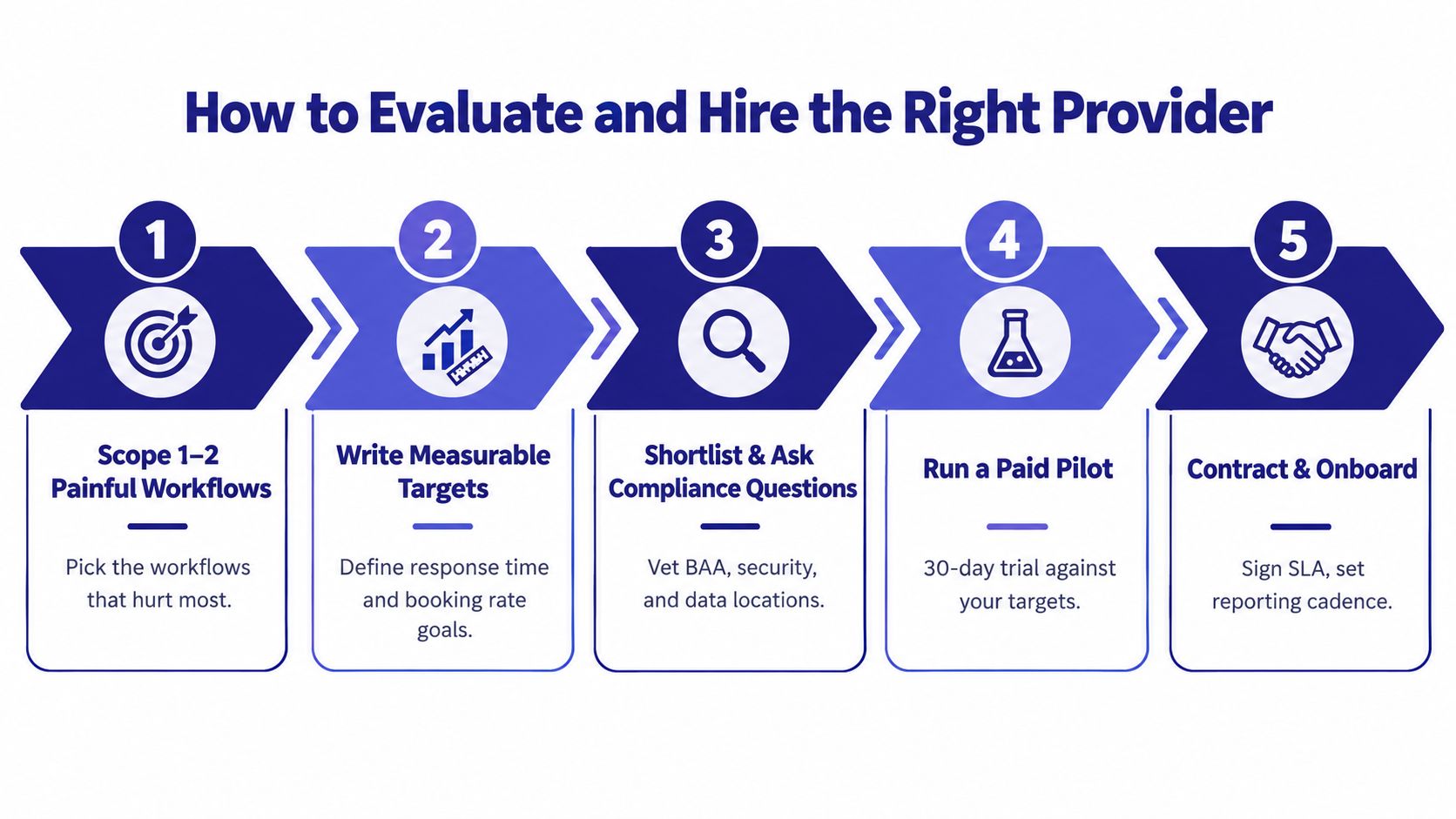
Buy the workflow first. Then buy the worker or the software. If you do it backward, you end up paying for capability you can't absorb, or worse, capability that looks good on paper and creates rework in practice.
Scope, score, and pilot
Start with one or two painful workflows. Write them as measurable targets, not vague goals. For example, “reduce callback backlog,” “shorten intake handling time,” or “improve booking completion” gives you something real to test against.
Then force every demo through those exact tasks. Don't sit through a generic feature tour and nod politely. Give the vendor your workflow, your edge cases, and your escalation rules, then watch how they handle them.
Use a simple scorecard:
- Workflow fit: Can the vendor handle your real cases, not just ideal ones?
- Compliance readiness: Can they answer data and access questions clearly?
- Escalation quality: Do they know when to stop and hand off?
- Reporting discipline: Can they produce logs, audit trails, and summary metrics?
- Change tolerance: Will your staff use this after the novelty wears off?
Compare sourcing options for healthcare teams before you shortlist vendors
What to ask before you sign
Ask who owns the data, whether training can be opted out of, how termination works, and whether you can audit performance. Ask for reference calls from practices like yours, not a generic testimonial PDF. Then run a paid pilot before you commit.
A 30/60/90-day pilot should be blunt. If the first month doesn't show a credible improvement in your chosen workflow, stop. If month two still depends on constant rescue from your staff, stop. If month three hasn't reduced friction, the model is wrong for your clinic.
Pricing, ROI, and the Numbers That Matter
Price alone is a bad way to choose. A cheap assistant that creates review work costs more in the end. A higher-priced managed service that removes a bottleneck is often the better buy, even before you count the hidden admin drag.
The pricing structures you will encounter
Human VA services are usually priced per hour. Agency setups are often packaged per call, per claim, or as a managed monthly service. AI assistants tend to be sold per interaction or by subscription. Those structures are not interchangeable, because each one shifts risk to a different part of the workflow.
Keep the ROI question tight. Ask how many minutes a task saves, what the undertriage rate is for anything clinical-adjacent, how often clinicians override the output, and whether patients get served faster or better. For triage and routing, track the rate and severity of missed high-acuity cases before any headline accuracy score.
What counts as real return
Real return shows up in fewer dropped calls, shorter callback queues, cleaner intake, and less physician time lost to documentation friction. In the evidence base, voice-based systems have been reported to reduce documentation time by 19%, machine-learning approaches reduced mis-triage rates by 0.3% to 8.9%, and broader implementation has been associated with median daily documentation savings of 6.89 minutes and total EHR-time savings of 19.95 minutes per physician per day, about 83 hours annually systematic review evidence review. Treat those figures as directional evidence, not a promise. Your workflow design decides the actual result.
A vendor that cannot tie pricing to a workflow metric you already measure is selling theater.
Automation can also move labor instead of removing it. If staff still has to review every action, fix every exception, or re-enter data because the integration is weak, the savings disappear. A paid pilot should expose that before renewal does.
Onboarding, SLAs, and KPIs That Keep It Working
A rollout that works starts small and gets stricter, not looser. Week one is access, training, and shadowing on a narrow slice of traffic. Month one is the first real KPI review. Quarter one is the go or no-go decision.
What the SLA should cover
Your SLA should name the basics clearly: uptime, response time, escalation latency, audit-log delivery, and breach-notification steps. If the vendor won't put service levels on paper, they're asking you to trust them where you should be measuring them.
The KPI dashboard should be equally direct:
- Minutes saved per task: Track whether the assistant frees staff time.
- Undertriage rate: Watch this closely for any symptom or routing workflow.
- Clinician override rate: If staff keeps rejecting outputs, the design is off.
- Patient-access lift: Measure whether patients get through faster and with less friction.
- Completion quality: Check whether tasks arrive usable or need cleanup.
How to manage the change
Tell clinicians where the assistant is used and where it isn't. Tell patients when AI is involved in a way they'll notice. Capture override reasons so the workflow improves instead of repeating the same errors.
If the assistant is handling anything patient-facing, give staff a clean escalation script. The point isn't to defend the system. The point is to protect the workflow when the system fails.
A good rule for ongoing management is simple: if a metric is flat, or if staff sentiment is worsening while volume stays the same, the vendor isn't earning its seat. Good medical virtual assistant services reduce friction, they don't demand a new layer of supervision just to stay alive.
If you're evaluating medical virtual assistant services this month, use the 30/60/90-day scorecard above, cut your shortlist to two vendors, and run a paid pilot against one real workflow before you sign anything long-term. If you want to keep discovery work moving while you assess staffing and automation options, publish your project on earlyhunt.com and use the visibility to pressure-test the market before you commit.